
Need polished dope vocals without turning every note into a robot voice? The best autotune plugins now cover live tracking, detailed editing, free pitch correction, and creative vocal effects. I’ll break down the strongest picks, where each one fits, and what to watch before you spend money.
Table of Contents
Graillon 3: Best free option for real-time tuning and vocal effects
Waves Tune Real-Time: Best for low-latency monitoring and live vocals
Buyer checklist: matching the best autotune plugin to your vocal workflow
1. Indepth Jay Beats
Indepth Jay Beats isn’t an autotune plugin. It’s the best starting point here when your vocal chain begins with the right beat, key, and song plan.

Pitch correction can fix a note, but it can’t fix a beat that fights your voice. A strong instrumental gives you room to find the right melody, leave space for your words, and set a vocal tone that fits the track. That matters for trap, boom-bap, hip hop, and R&B records.
I’m Jason, and I’ve been producing since 2007. Indepth Jay Beats gives independent artists a place to find instrumentals, review licensing choices, and move into custom production when a standard beat doesn’t fit.
Start by checking the beat’s key before you record. Then set your tuning plugin to that key and scale. If you tune a vocal against the wrong scale, the plugin may pull good notes toward bad targets.
You’ll also want to know what your license covers. A basic license may fit a demo or limited release, while a larger distribution run can call for different terms. Read the license before you upload the song. That small check can save a messy rights issue later.
For the mix stage, these trap beat mixing practices for producers can help you leave space for the tuned vocal instead of stacking effects on top of a crowded instrumental.
The limitation is simple: Indepth Jay Beats won’t correct pitch. You still need a plugin or editor for that job. But the beat comes first. **Pick the right record, set the key, then tune with purpose.**
2. Melodyne: Best for detailed offline vocal editing
Melodyne is the strongest choice for careful vocal repair after recording. It doesn’t process the vocal in real time, so it fits editing and mix work better than live monitoring.

Its key strength is note-level control. DNA Direct Note Access can separate notes inside a chord. That gives you a way to work with layered musical material instead of treating the whole clip as one block.
Think of a lead vocal that has the right emotion but a few weak notes. You can edit those notes after the take, keep the stronger parts alone, and avoid forcing the entire performance into a rigid grid. That approach often sounds more human than running hard correction across every phrase.
Melodyne also suits stacked vocals. You can inspect a lead, then check doubles or harmonies one phrase at a time. This helps when a harmony note clashes with the chord, even though the lead itself sounds fine.
Offline editing takes more time than a live tuner. You must transfer or analyze the audio before making changes, so it isn’t the first pick for singing through effects while you track. It also asks for more judgment. A note can be technically correct and still feel wrong for the performance.
Use it when the singer gave you a take worth saving. Don’t use it to erase every bend, slide, or breath. Those details carry the feeling.
For a natural result, fix the notes that distract you first. Leave the small movement that makes the vocal sound like a person.
3. Graillon 3: Best free option for real-time tuning and vocal effects
Graillon 3 is a free real-time tuner that also works as a creative voice box. It’s a smart first download for singers who want live correction without a paid plan.
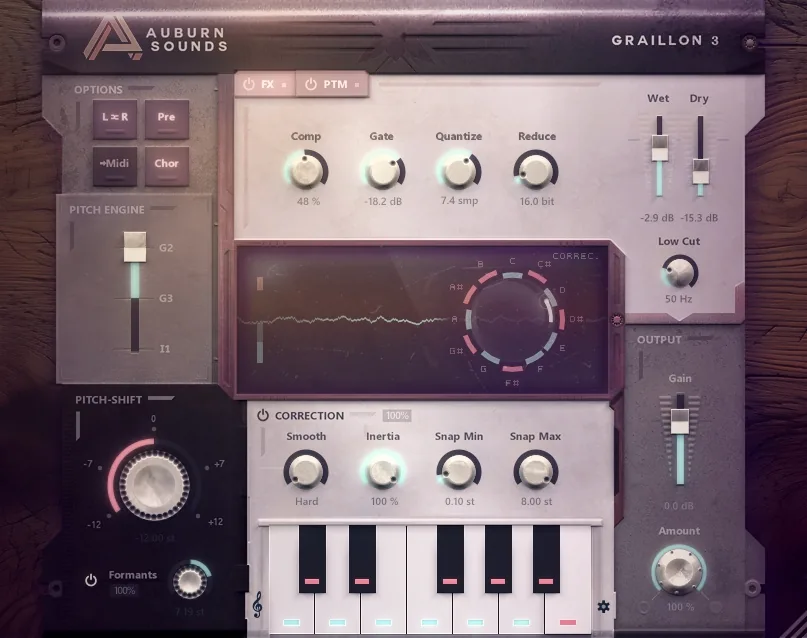
The free option supports real-time vocal tuning, which makes it useful while you record. It also has formant control. Formants shape the tone of a voice, so moving them can change the character without simply raising or lowering the whole performance.
That makes Graillon 3 useful for hooks, ad-libs, and rough song ideas. Set the key, sing through the effect, and hear whether the melody works before you spend hours comping takes. The same setup can add a more obvious synthetic tone when the effect is part of the sound.
Its limits show up when you need subtle, high-end correction across a full lead. The free version’s pitch-shifted harmony effect can sound like shifted audio rather than a new singer. That can work in a demo or an intentionally artificial hook, but it may feel exposed in a polished ballad.
Pitch shifting moves the source audio, while voice modeling aims to produce a more separate vocal character.
Graillon 3 earns its place because the cost barrier is low and the live workflow is clear. If you want a free tool for testing melodies, try it before buying a flagship editor.
4. Waves Tune Real-Time: Best for low-latency monitoring and live vocals
Waves Tune Real-Time is built for fast correction while you sing. It’s a strong fit for vocalists who need to hear the effect during tracking or use pitch correction in a live setup.
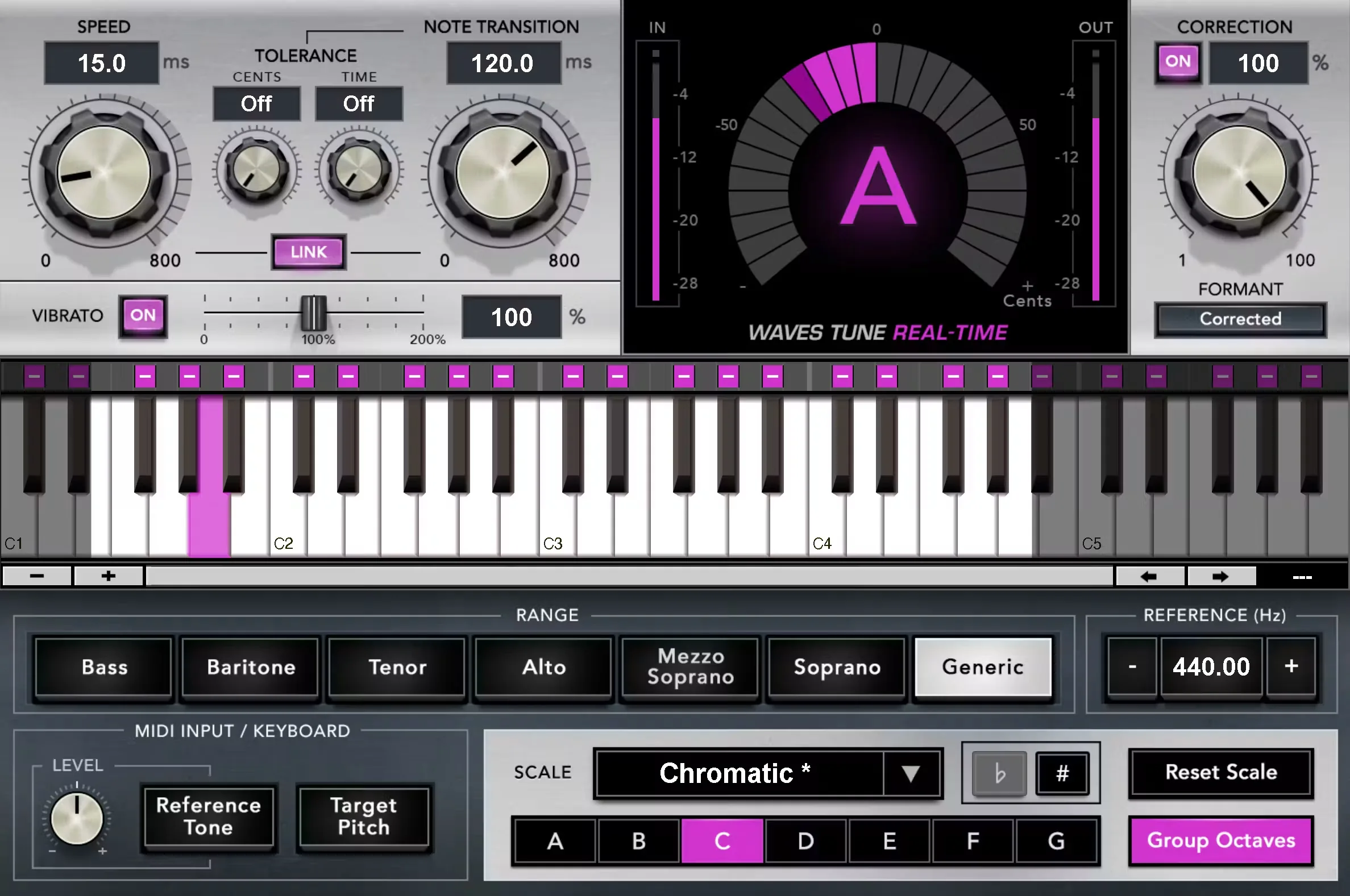
Low latency is the main reason to pick it. Delay between your voice and your headphones can throw off timing and make a take feel strange. A fast plugin keeps the monitored vocal close to your natural performance.
Key and scale settings deserve care. A real-time tuner needs a target. If the song is in C minor but the plugin is set to C major, certain notes may move toward the wrong pitch. For songs with changing sections, automate the scale or use separate plugin instances when your DAW makes that easier.
The speed control also shapes the sound. Faster correction creates a sharper, more obvious effect. Slower correction leaves more of the singer’s movement in place. Start slower for verses, then push the speed when a hook needs that tight, modern edge.
Live use brings one extra risk: the plugin only knows the settings you give it. Wrong keys can be more noticeable on stage because you can’t stop and redraw a note. Save each song with its correct scale before rehearsal.
If your home setup feels crowded, keep the tracking chain small. This guide to removing vocals from a song also explains why source audio and signal layout matter when you work with vocal parts and backing tracks.
Choose Waves Tune Real-Time when monitoring delay is your main concern. For detailed cleanup after the take, use an offline editor instead.
5. MAutoPitch: Best free pitch correction with formant control
MAutoPitch is a free real-time pitch tool with formant control. It’s aimed at singers and producers who want a natural option for heavier tuning without paying first.
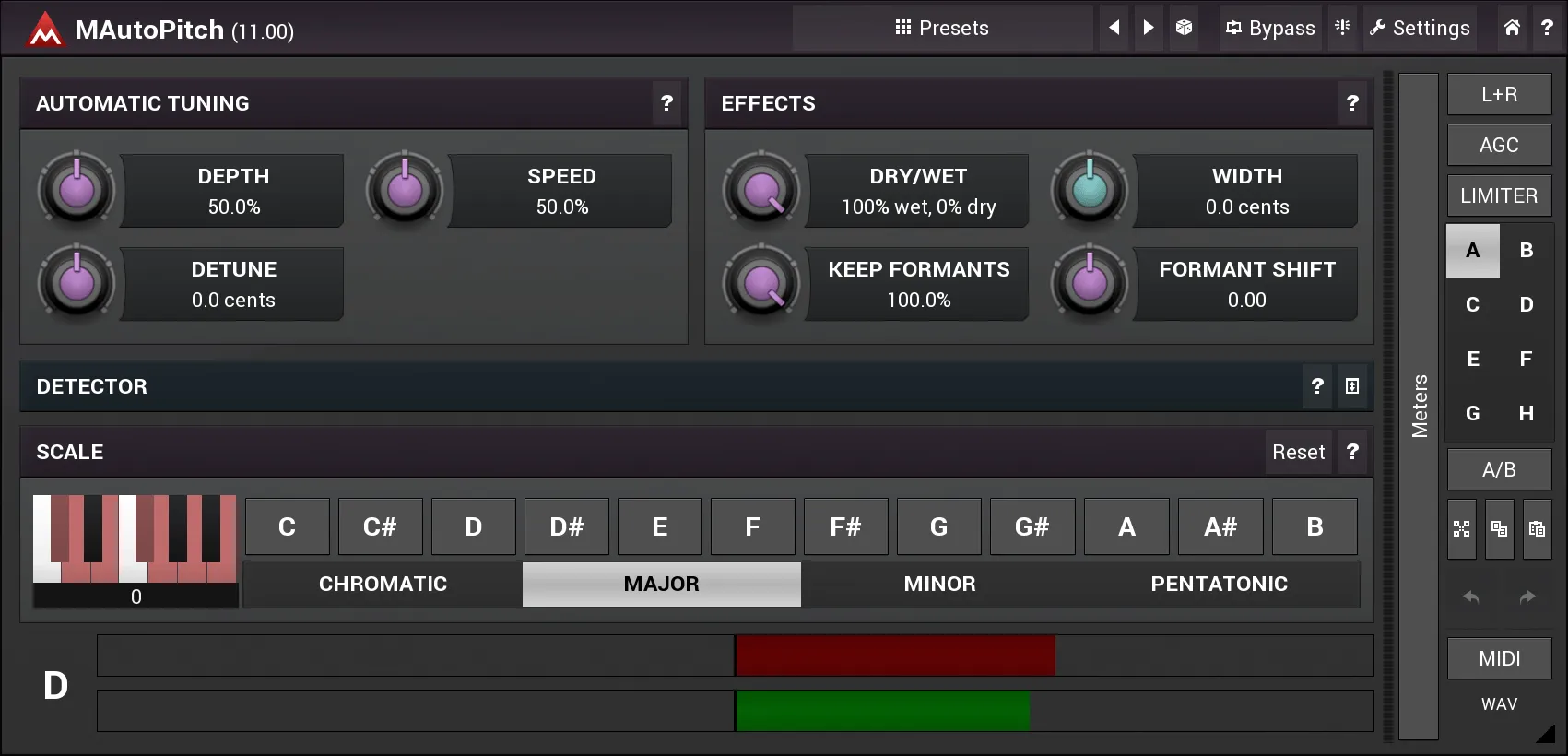
Formant shift is useful when strong correction makes a voice feel thin, sharp, or artificial. MAutoPitch lets you adjust that voice character while the pitch effect stays active. This can help keep the voice natural under heavier tuning.
Try it on a lead vocal with a clear key and scale. Set the correction amount with restraint, then move the formant control in small steps. If the voice suddenly sounds deep, nasal, or cartoon-like, pull back. The goal is a better fit, not a strange new singer.
MAutoPitch also works well for doubles and ad-libs. You can use stronger correction on a background part while leaving the lead more open. That contrast helps the lead stay in front without making every vocal sound identical.
The tradeoff is control depth. A free plugin can cover the core job, but it may not give you the same editing detail as a paid tool. You may still need manual clips or a separate pitch editor for a note that confuses the tuner.
MAutoPitch is a good pick when your budget is tight and formant control matters. It also gives new producers a way to learn how correction speed and vocal tone interact before they commit to a larger setup.
Key Takeaway: Free does not mean useless here. Real-time correction is common, but advanced control over vocal character remains less common.
Buyer checklist: matching the best autotune plugin to your vocal workflow
The best autotune plugins are the ones that match the moment you’re working in. Tracking, mixing, live performance, and sound design ask for different controls.
Studio tracking versus offline repair
Choose real-time processing when you need to hear tuning through your headphones. Graillon 3, Waves Tune Real-Time, and MAutoPitch fit that job. Choose offline editing when the take is done and you want to move individual notes with care. Melodyne fits that lane.
Sound controls to check
Retune speed: Faster settings sound tighter and more obvious. Slower settings keep more natural movement.
Humanize: This helps long notes keep some life instead of snapping hard from pitch to pitch.
Vibrato control: Useful when you want to shape sustained notes rather than flatten them.
Key detection: Helpful when you know the beat but aren’t sure of its scale. Always listen back before committing.
Formant handling: This changes vocal tone while pitch moves. It matters when heavy correction makes the voice feel unnatural.
AI-assisted tools: Voice modeling can make harmonies sound more separate than a simple pitch shift. It isn’t the same as basic correction.
CPU use matters during recording. A heavy chain can add delay, especially when several tracks are active. Antares says AutoTune 2026 is built for low CPU use, low-latency processing, and major DAW formats such as VST3, AU, and AAX on its official AutoTune 2026 product page.
Check your DAW format before you buy. VST3 is common on Windows and many cross-platform DAWs. AU is used in Apple hosts. AAX is used by Pro Tools. Your plugin must match the host format, or it won’t appear in the insert menu.
Workflow | Look for | Best fit from this list | Main watch-out |
|---|---|---|---|
Record while hearing tuning | Real-time mode and low latency | Waves Tune Real-Time | Set the key correctly |
Fix a few notes after recording | Detailed note editing | Melodyne | It isn’t a live tracker |
Spend nothing at first | Free real-time correction | Graillon 3 or MAutoPitch | Free tools may have less depth |
Shape vocal tone under heavy tuning | Formant control | MAutoPitch | Small moves sound more natural |
Build a sound around the beat | Correct key and a usable vocal pocket | Indepth Jay Beats | It is a beat marketplace, not a tuner |
There’s also a gap between basic formant control and advanced vocal shaping. Auto-Tune Pro 11 offers advanced formant and vibrato controls. AutoTune 2026 is a streamlined, CPU-friendly package.
Pro Tip: Record a short phrase with three settings: slow, medium, and fast correction. Pick the one that supports the song instead of judging the plugin from its preset.
For most independent artists, start free if you’re learning. Move to a paid editor when manual note control saves you time on finished records. If the song itself still feels wrong, revisit the beat and vocal key before buying another plugin.
FAQ
What do autotune plugins actually do?
Autotune plugins detect the pitch of a recorded or live vocal and move it toward a chosen note or scale. Faster correction can produce the sharp, obvious effect heard in many modern songs. Slower correction keeps more natural movement. The plugin still needs the right key, because wrong scale settings can target the wrong notes.
What is the best free autotune plugin?
Graillon 3 and MAutoPitch are strong free starting points for real-time vocal tuning. Graillon 3 also leans into voice effects, while MAutoPitch includes formant control for tone shaping. GSnap is another free option with automatic correction and MIDI mode. Your DAW format and preferred sound should decide the final pick.
Can free autotune plugins work in real time?
Yes, several free autotune plugins can process vocals in real time. Graillon 3, MAutoPitch, and GSnap are all listed with live processing support. Keep your buffer low while tracking, then raise it later if you need more processing room during the mix.
How do I make autotune sound natural?
Use the correct key first, then slow the retune speed until the vocal keeps some movement. Humanize controls can help long notes sound less stiff. Formant control may also help when heavy correction changes the voice’s character. Fix only the notes that pull attention away from the performance.
Do autotune plugins work with every DAW?
Autotune plugins don’t work with every DAW by default. Check whether the plugin includes your host format, such as VST3, AU, or AAX. Also check the operating system and CPU needs. A plugin can be installed correctly and still fail to show if the DAW scans a different format folder.
Should I use pitch correction while recording or after?
Use real-time pitch correction while recording if the effect helps you perform with confidence. Use offline editing after the take when you need detailed note work. Many vocalists use both: light correction for monitoring, followed by careful edits on the final comp.
Conclusion
Start with MAutoPitch or Graillon 3 if you need free live tuning. Choose Waves Tune Real-Time for low-latency tracking, or Melodyne for detailed repair after the take. Before you record, pick a beat from Indepth Jay Beats, confirm its key, and test your vocal chain on one short phrase. Peace, Jason.

Get 20+ Free Beats delivered to your inbox
Drop your name and email and I'll send a pack to your inbox right away.
We respect your inbox, no spam. Promise!