Rap vocal loudness is defined by one core rule: your lead vocal sits 3 to 6 dB above the loudest instrument in the beat, with momentary peaks hitting around -10 to -8 LUFS. That target gives your voice clarity, presence, and the punch that separates a professional mix from a bedroom demo. Knowing how loud rap vocals should be in a mix is not guesswork. It is a measurable, repeatable process that every serious producer needs to lock in before they send a track anywhere.
How loud should rap vocals be in a mix?
The short answer is loud enough to cut through, but controlled enough to breathe with the beat. The industry standard for mixing rap vocals puts the lead vocal at 3 to 6 dB louder than the loudest instrumental element. That ratio keeps the voice front and center without burying the 808s and hi-hats that define the genre.
LUFS (Loudness Units Full Scale) is the measurement standard that streaming platforms use to normalize audio. It replaced simple peak metering as the go-to tool for judging perceived loudness. When your vocal momentary LUFS reads between -10 and -8, listeners hear it as present and clear on Spotify, Apple Music, and YouTube without the platform pulling it down.
Reference tracks are your calibration tool. Pull up a released track in your genre and A/B your mix against it. If the vocal on the reference cuts through the beat with authority and yours sounds buried or thin, your levels need work before you touch another plugin.
What are the key mixing prerequisites for setting rap vocal levels?
Getting your vocal levels right starts before you touch a fader. These foundational steps set you up for accurate decisions every time.
Work with an unmastered beat. Mix into unmastered beats peaking around -6 dBFS. A mastered beat is already loud and compressed. Adding a vocal on top leaves you with no headroom and a mix that clips before it reaches a master.
Use a LUFS meter on your master bus. Free tools like Youlean Loudness Meter give you real-time integrated and momentary LUFS readings. Watch both numbers as you mix.
Gain stage before you process. Your raw vocal should hit your DAW channel at around -18 to -12 dBFS before any plugins touch it. That gives your compressor and EQ room to work without distorting the signal.
Record consistent takes. A vocal that jumps 10 dB between verses makes level-setting nearly impossible. Coach your artist or yourself to maintain a steady distance from the mic and a consistent delivery volume.
Always mix with the full beat playing. Mix decisions made in solo mode lie to you. The vocal needs to sit inside the full track context, not just sound good in isolation.
Pro Tip: Before you even open a compressor, set your gain staging so the vocal sits at a healthy level on the channel strip. Everything downstream depends on that foundation.
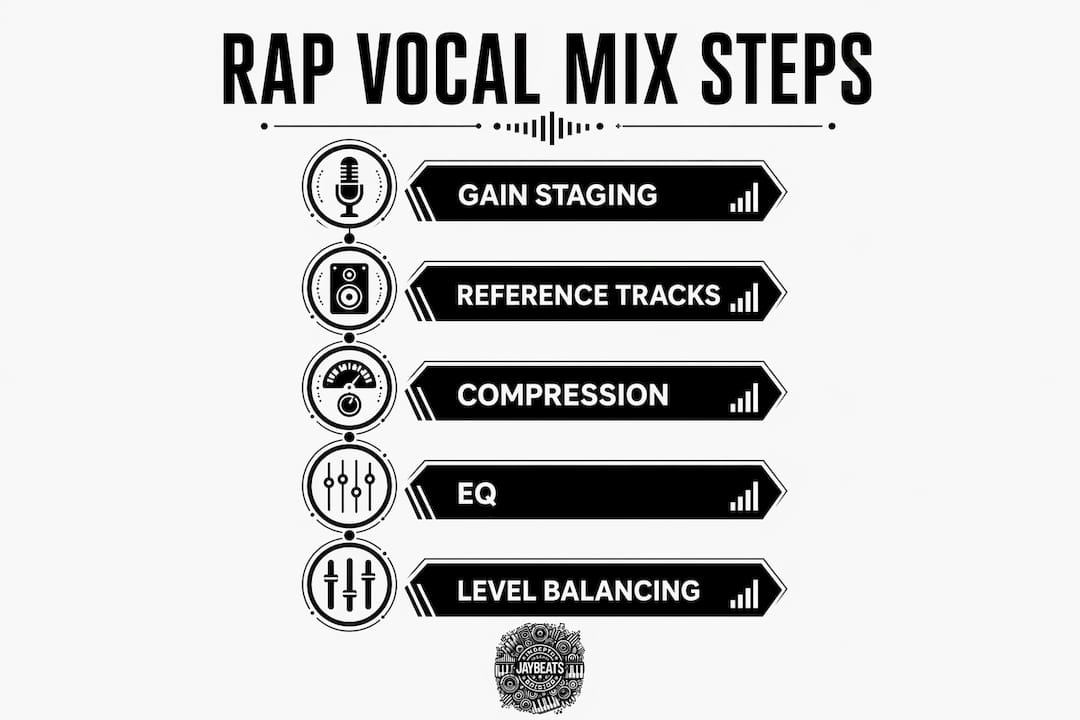
How to set rap vocal levels relative to the beat
Getting the vocal-to-beat balance right is the core skill in mixing rap vocals. Follow these steps in order and you will get there faster than trial and error alone.
Start with the beat at a comfortable listening volume. Set your monitors or headphones to a level you can work at for an hour. Do not crank it. Ear fatigue kills your judgment.
Bring the vocal fader up from zero. Raise it until the voice sits clearly above the beat. You are listening for the vocal to feel present without sounding like it is shouting over the music.
Check the dB difference between vocal and beat. Solo the loudest element in the beat (usually the 808 or snare). Note its peak level. Your vocal should read 3 to 6 dB higher than that element.
Read your LUFS meter. Vocal momentary LUFS should land in the -10 to -8 range. If it reads lower, raise the fader or add makeup gain after compression.
Use parallel compression for consistency. Parallel compression blended at 30–40% with a 10:1 ratio keeps the vocal audible and detailed even against heavy low-end elements like 808 sub-bass.
Automate the vocal volume. Draw in volume automation to push the chorus vocal up 1 to 2 dB and pull the verse back slightly. This keeps the energy dynamic without touching your compressor settings.
Vocal element | Target level relative to lead |
|---|---|
Lead rap vocal | 3–6 dB above loudest instrument |
Lead vocal momentary LUFS | -10 to -8 LUFS |
Backing vocals and harmonies | 6–12 dB below lead vocal |
Ad-libs | 6–10 dB below lead vocal |
Pro Tip: Pull up a reference track in your DAW and match your vocal fader level to the reference vocal. Your ears will calibrate faster than any meter alone.
How to use compression and EQ to control rap vocal loudness
Compression and EQ do not just shape tone. They directly control how loud and present your vocal feels in the mix. Getting these two tools right is what separates a flat vocal from one that hits.
Compression settings by genre
Trap vocals require heavier compression than traditional hip-hop. Trap compression targets 6–10 dB of gain reduction to create that dense, locked-in sound you hear on modern trap records. Traditional hip-hop vocals use a lighter touch, with 2–4 dB of gain reduction to preserve more natural dynamics and breath.
For hip-hop vocals, a compression ratio of 4:1 to 6:1 with an attack time of 5–15 ms and a release of 50–100 ms keeps the energy without squashing the life out of the performance. The attack lets the initial consonants punch through before the compressor clamps down. The release lets the vocal breathe between phrases.
Over-compression is a real problem. When you push gain reduction past what the performance needs, the vocal loses its dynamics and starts sounding robotic. That kills the emotional impact of the rap, no matter how good the lyrics are.
EQ moves that affect perceived loudness
High-pass filter at 80–120 Hz. Cut low-end rumble below 80 Hz on every vocal. That frequency range adds mud without adding body.
2–4 dB cut in the 200–400 Hz range. This is where boxiness lives. Cutting here clears space for the 808 and kick to breathe while making the vocal sound cleaner.
Boost 2–5 kHz for presence. This range is where vocal intelligibility lives. A 2–3 dB boost here makes lyrics easier to understand at any volume.
Add air at 10–16 kHz. A gentle shelf boost in this range adds brightness and separation from the beat without making the vocal harsh.
Context-dependent deep cuts. In mixes with heavy 808s, a drastic cut around 120 Hz can clear significant space. Test it with the full beat playing before committing.
Pro Tip: Always cut before you boost. Removing problem frequencies first means you need less additive EQ to get the vocal sitting right. Less processing usually sounds more natural.
How to balance ad-libs, harmonies, and backing vocals
Your lead vocal is the star. Everything else in the vocal stack exists to support it, not compete with it. Getting these levels right adds depth and width to your mix without muddying the lead.
Backing vocals and harmonies sit 6 to 12 dB below the lead. Harmonies mixed at this range add fullness without pulling the listener’s attention away from the main performance.
Ad-libs go 6 to 10 dB below the lead. Ad-libs need separate processing chains with more reverb and wider panning than the lead vocal. They live in the sides of the stereo field, not the center.
Pan backing vocals wide. Place harmonies at 30–50% left and right. This creates width without cluttering the center where the lead and kick drum live.
Use more reverb on supporting vocals. A longer reverb tail on harmonies and ad-libs pushes them back in the mix naturally. The lead stays dry and present up front.
Check blend in mono. Collapse your mix to mono and listen. If the backing vocals disappear, they are too quiet. If they compete with the lead, pull them down 2 dB and check again.
For a deeper look at balancing vocal layers against a loud trap beat, the process follows the same principles at every level of the vocal stack.
Common mistakes that hurt your rap vocal loudness
Most vocal level problems come from a handful of repeatable mistakes. Knowing them saves you hours of frustration.
Mixing over a mastered beat. This is the number one mistake independent artists make. A mastered beat has no headroom left. Your vocal will either clip the master bus or sit too low to compete with the already-loud instrumental.
Setting the vocal too low. A buried vocal is worse than a loud one. If a casual listener has to strain to hear the lyrics, the mix fails its most basic job.
Over-compressing until the vocal sounds flat. Heavy compression without careful attack and release settings kills the natural rhythm and emotion of a rap performance.
Too much reverb on the lead vocal. If someone who is not a producer can clearly hear the reverb on your lead vocal, it is too loud. Reverb wet levels on lead vocals should stay in the 10–20% range with short decay times.
“A vocal reverb that is audible to non-producers is too loud. Aim for dry, present, and punchy vocals. The reverb should be felt, not heard.”
The fix for most of these issues is simple: always mix with reference tracks playing, use your LUFS meter consistently, and check your mix on multiple playback systems before you call it done. Your car speakers, earbuds, and studio monitors will all tell you something different.
Key Takeaways
Rap vocal loudness is not about being the loudest element in the mix. It is about sitting 3 to 6 dB above the beat with controlled dynamics, clean EQ, and a vocal stack that supports without competing.
Point | Details |
|---|---|
Lead vocal target level | Set the lead vocal 3–6 dB above the loudest instrument, with momentary peaks at -10 to -8 LUFS. |
Gain staging foundation | Mix into unmastered beats peaking at -6 dBFS to preserve headroom for the vocal. |
Compression by genre | Trap vocals need 6–10 dB gain reduction; traditional hip-hop vocals need 2–4 dB. |
EQ for clarity | High-pass at 80–120 Hz, cut 200–400 Hz, boost 2–5 kHz for presence and intelligibility. |
Vocal stack levels | Harmonies sit 6–12 dB below lead; ad-libs sit 6–10 dB below lead with wider panning. |
What I have learned mixing rap vocals since 2004
Starting out, I made every mistake on this list. I mixed vocals over mastered beats, cranked the reverb because it sounded cool in headphones, and wondered why my mixes sounded amateur next to commercial records. The answer was always the same: I was not measuring anything. I was just guessing.
The shift happened when I started using LUFS meters and reference tracks together. Not one or the other. Both. The meter tells you the number. The reference track tells you what that number should feel like. You need both to develop a real ear for vocal levels.
The other thing I will tell you straight: clean recordings beat processing every time. A vocal recorded with consistent mic technique, a proper gain stage, and a quiet room will sit in a mix with half the effort of a poorly recorded take. Do not try to fix a bad recording with plugins. Get it right at the source.
Compression is where most producers get lost. Trap vocals are supposed to feel dense and locked in. That requires real gain reduction, sometimes 8 to 10 dB. But you have to match your attack and release to the delivery. A fast rapper needs a faster release than a melodic hook. Listen to the performance and let it tell you what the compressor needs to do.
The last thing I will say is this: trust your reference tracks more than your instincts until your instincts are trained. Pull up records you respect, match your vocal to that level, and then make your creative decisions from there. That is how you build a professional ear.
— Indepthjaybeats
Beats built for rap vocals that actually mix right
Getting your vocal levels dialed in means nothing if the beat underneath is fighting you. Indepthjaybeats has been producing trap and boom bap beats since 2007 with placements in WWE 2K25 and Love And Hip Hop Atlanta. These beats are built with headroom and clarity in mind, so your vocal has room to sit exactly where it needs to.

Every instrumental is available unmastered, which means you get the headroom you need to mix your vocal properly from the start. Check out the trap beats catalog for hard-hitting 808 instrumentals built for rap vocals, or grab a free beat pack to hear the quality before you commit. If you need your vocal mixed and mastered to a professional standard, Indepthjaybeats also offers mixing and mastering services built specifically for rap artists.
FAQ
How loud should a rap vocal be in dB?
The lead rap vocal should sit 3 to 6 dB above the loudest instrument in the beat. Momentary LUFS readings should land between -10 and -8 LUFS for a clear, present sound on streaming platforms.
What LUFS should rap vocals be mixed at?
Rap vocals should hit momentary peaks of -10 to -8 LUFS during the loudest parts of the performance. This target keeps the vocal audible after streaming platforms apply their loudness normalization.
Should I mix vocals over a mastered or unmastered beat?
Always mix over an unmastered beat peaking around -6 dBFS. A mastered beat leaves no headroom for the vocal, which causes clipping or forces the vocal to sit too low in the mix.
How much compression should I use on rap vocals?
Trap vocals need 6–10 dB of gain reduction for that dense, locked-in sound. Traditional hip-hop vocals use 2–4 dB of gain reduction with a 4:1 to 6:1 ratio to keep more natural dynamics.
How low should ad-libs be in a rap mix?
Ad-libs should sit 6 to 10 dB below the lead vocal. They need separate processing chains with more reverb and wide panning to add width without pulling attention from the main performance.
Recommended

Get 20+ Free Beats delivered to your inbox
Drop your name and email and I'll send a pack to your inbox right away.
We respect your inbox, no spam. Promise!