
Mixing raw vocals over a loud trap beat is defined by one core challenge: your voice has to compete with heavy 808s, layered hi-hats, and a wall of sound that was built to dominate. Most independent artists lose that fight because they skip aggressive EQ carving and compression. The fix is a repeatable three-step workflow covering high-pass filtering, low-mid cleanup, presence boosting, and parallel compression. Get these right, and your vocals will sit on top of the beat instead of drowning inside it.
How to mix raw vocals over a loud trap beat with EQ
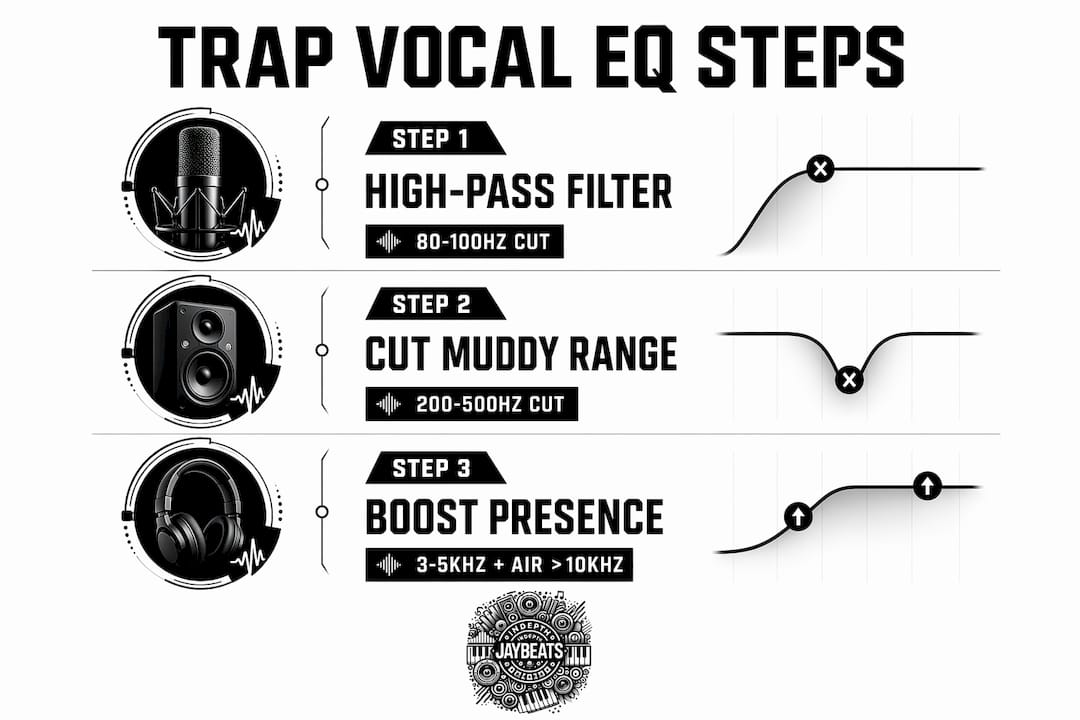
EQ is the first weapon you reach for when trap beat vocal mixing feels off. The goal is not to make the vocal sound good in solo. The goal is to carve out a frequency lane so the vocal and the beat stop fighting each other.
Step 1: High-pass filter at 80–100Hz
High-pass filtering at 80–100Hz removes sub-bass rumble that competes directly with your 808. That rumble is invisible to the ear but it eats headroom and muddies the low end fast. Set a steep slope, around 24dB per octave, and commit to it. Your 808 needs that space to breathe.

Step 2: Cut the mud at 200–500Hz
Removing low-mid mud in the 200–500Hz range prevents your vocal from sounding like it is trapped inside a cardboard box. This is the most overlooked step in trap vocal mixing. Sweep through that range with a narrow Q, find the frequency that sounds boxy or thick, and cut it by 3–6dB. The vocal will open up immediately.
Step 3: Boost presence at 3–5kHz and add air above 10kHz
Boosting upper mids at 3–5kHz gives the vocal the edge it needs to cut through dense percussion and layered synths. A gentle shelf boost above 10kHz adds air and brightness without making the vocal harsh. Keep the air boost subtle, around 2–3dB, because trap beats already carry a lot of high-frequency energy from hi-hats.
This three-step EQ approach is the foundation of trap vocal intelligibility. Skip any one of these steps and the vocal will either clash with the 808, sound dull, or get swallowed by the mix.
Pro Tip: Run your EQ before compression in the signal chain. Compressors react to the full frequency content of the signal. If you compress a muddy vocal first, the compressor will pump on the low-mid buildup and make everything worse.
How to use compression for punchy, consistent trap vocals
Compression is where trap vocals get their signature “in your face” sound. Pop and R&B mixes use gentle compression to preserve dynamics. Trap does the opposite. The genre demands aggressive gain reduction with ratios between 6:1 and 10:1, targeting 6–10dB of gain reduction on the peaks. That level of compression locks the vocal into the pocket of the beat.
Here is how to set it up correctly:
Ratio: Start at 6:1 and push to 10:1 if the vocal still feels inconsistent. Higher ratios work well on aggressive rap deliveries.
Attack: Set a fast attack, around 5–10ms, to catch peaks before they spike. This tames the loudest consonants without killing the energy.
Release: Use a medium release, around 60–100ms, so the compressor lets go naturally between syllables. Too slow and the vocal sounds choked.
Threshold: Set it so you are consistently hitting 6–10dB of gain reduction during the loudest phrases.
Makeup gain: Bring the output level back up after compression so the vocal sits at the right volume in the mix.
The real secret in modern trap mixing is parallel compression. You send the vocal to a duplicate channel, crush that duplicate with a high ratio around 10:1, and blend it underneath the dry signal. The dry signal keeps the natural dynamics and transient punch. The compressed duplicate adds thickness and presence. Together they create a vocal that sounds both controlled and alive.
Parallel compression prevents the vocal from sounding thin or choked at high compression levels. It retains dynamics and presence by blending a heavily compressed duplicate underneath the dry signal. This is why trap vocals sound “in your face” while still feeling dynamic against heavy drums and 808s.
Pro Tip: After setting your compressor, check the vocal against the full beat, not in solo. A setting that sounds over-compressed in solo often sounds perfect in context because the beat masks some of the artifacts.
What effects and automation keep vocals clear over trap beats?
Effects are where a lot of independent artists accidentally bury their vocals. Reverb and delay add depth and atmosphere, but too much of either will wash out the lead vocal and make it disappear into the beat. The fix is tight settings and smart routing.
Reverb settings for trap vocals
Tight reverb with decay times between 0.6 and 1.2 seconds and pre-delay from 15 to 50ms keeps trap vocals clear and wet without muddying the mix. The pre-delay creates a small gap between the dry vocal and the reverb tail. That gap is what makes the vocal feel present even when the reverb is active. Always high-pass filter your reverb return at 300–500Hz to stop low-end buildup from clouding the mix.
Sidechain ducking on effects returns
Sidechain compression on reverb and delay sends keyed to the dry vocal is one of the most effective tools in trap vocal production. When the vocal is singing or rapping, the sidechain ducks the reverb and delay returns automatically. When the vocal stops, the effects bloom back up and fill the space. The result is a vocal that always sits in front of the effects rather than behind them.
Here is a simple setup for sidechain ducking on effects:
Route your reverb and delay to separate return channels.
Insert a compressor on each return channel.
Set the sidechain input of each compressor to the dry vocal channel.
Use a fast attack and medium release so the ducking is smooth and natural.
Adjust the threshold until the effects duck noticeably when the vocal hits.
Saturation and subtle warmth
Add a light saturation plugin after your compressor to bring back warmth and grit that heavy compression can strip away. Tape-style saturation works well on rap vocals because it adds harmonic content in the upper mids without making the vocal sound distorted. Keep the drive low. You want the vocal to feel warm and present, not overdriven.
Effect | Setting | Purpose |
|---|---|---|
Reverb decay | 0.6–1.2 seconds | Keeps tail short and clear |
Pre-delay | 15–50ms | Separates vocal from reverb |
Reverb HPF | 300–500Hz | Removes low-end buildup |
Delay wet mix | 15–25% | Adds depth without washing out |
Sidechain ducking | Keyed to dry vocal | Keeps effects behind the lead |
Testing these settings on a real beat makes a big difference. Grab one of the hard 808 trap beats from Indepthjaybeats and run through each of these effect settings in real time. Hearing the changes on an actual loud trap beat is the fastest way to internalize what works.
How to troubleshoot common vocal mixing problems with loud trap beats
Even with the right workflow, things go wrong. Here are the most common problems and how to fix them fast.
Vocal sounds buried in the mix. Check your gain staging first. The vocal should be hitting around -18dBFS to -12dBFS before any processing. If the level is too low going in, no amount of compression or EQ will fix it. Also check for masking conflicts around 200–500Hz between the vocal and the beat’s mid-range elements.
Vocal sounds boxy or nasal. Go back to your EQ and sweep the 200–500Hz range more aggressively. Some vocals need cuts as deep as 8–10dB in that range to clear up. Trust your ears and cut until the boxiness disappears.
Compression is killing the energy. Pull back the ratio to 6:1 and increase the attack time to 15–20ms. This lets the initial transient of each word pass through before the compressor clamps down. Alternatively, blend more dry signal into your parallel compression setup to restore dynamics.
Reverb is washing out the vocal. Reduce the wet mix on your reverb to 15–25% and check that your sidechain ducking is working correctly. Too much reverb buries trap vocals fast. Gated and ducked delays combined with subtle reverb create intimacy without the wash.
Vocal sounds harsh or brittle. Back off the 3–5kHz boost by 1–2dB and check if your high-pass filter is cutting too high. Filtering above 120Hz can thin out the vocal body and make it sound sharp against the beat.
Pro Tip: Always check your mix on multiple playback systems: studio monitors, headphones, a phone speaker, and a car stereo. A vocal that sounds buried on monitors often sounds fine on earbuds, and vice versa. The car test is the most honest.
For a deeper look at trap beat mixing best practices, Indepthjaybeats covers the foundational challenges of working with dense instrumentals and how to approach them systematically.
Key Takeaways
Mixing raw vocals over a loud trap beat requires high-pass filtering, aggressive compression with parallel blending, and sidechain-ducked effects to keep the vocal present and clear.
Point | Details |
|---|---|
High-pass filter first | Cut below 80–100Hz to stop the vocal from clashing with the 808 bass. |
Cut the mud at 200–500Hz | Subtractive EQ in this range removes boxiness and opens up vocal clarity. |
Compress aggressively | Use 6:1 to 10:1 ratios with 6–10dB gain reduction to lock vocals in the pocket. |
Use parallel compression | Blend a crushed duplicate under the dry vocal to add thickness without killing dynamics. |
Sidechain your effects | Duck reverb and delay returns keyed to the dry vocal so effects never mask the lead. |
What I’ve learned mixing vocals over loud trap beats
I have been producing since 2007, and the number one mistake I see from bedroom artists is treating trap vocal mixing like pop mixing. They use gentle compression, a little reverb, and wonder why their vocals sound like they are coming from another room while the beat is in your face. Trap is aggressive by design. The mix has to match that energy.
The parallel compression technique changed everything for me. Before I started using it, I was either over-compressing and killing the life in the vocal, or under-compressing and losing consistency. Blending a crushed signal underneath the dry track gave me both at the same time. It sounds simple, but most artists skip it because it takes an extra five minutes to set up.
The other thing I will say is this: you cannot mix a bad recording into a good one. If the vocal was recorded in a room with too much reverb, or the gain was clipping on the way in, no EQ or compression trick will fully fix it. Clean recordings make everything downstream easier. Invest in acoustic treatment, even if it is just moving blankets and a closet. The mix starts before you open your DAW.
Experiment within the framework. The settings in this guide are starting points, not rules. Every vocal and every beat is different. The artists who get the best results are the ones who understand why each step works, not just what the numbers say.
— IndepthJayBeats
Practice these techniques with beats built for it
The fastest way to lock in these vocal mixing techniques is to practice them on beats that are actually built to challenge your mix. A flat, quiet instrumental will not expose the same problems that a loud, 808-heavy trap beat will.

Indepthjaybeats has a full catalog of buy hip hop beats built for independent artists who need production that hits hard and holds up under vocal processing. These are the exact type of instrumentals where high-pass filtering, parallel compression, and sidechain ducking make the biggest difference. If you want a professional to handle the mix entirely, Indepthjaybeats also offers online mixing and mastering services built specifically for independent trap artists. Put your vocals on a real beat and start testing today.
FAQ
What compression ratio works best for trap vocals?
Compression ratios between 6:1 and 10:1 with 6–10dB of gain reduction are standard for trap vocals. This level of compression creates the tight, “in-the-pocket” sound the genre is known for.
Why do my vocals sound buried in the trap beat?
Vocals get buried when low-mid frequencies between 200–500Hz clash with the beat’s mid-range, or when reverb and delay are too loud. Cut that frequency range with EQ and use sidechain ducking on your effects returns to fix it.
What is parallel compression and why does it matter for trap?
Parallel compression blends a heavily compressed duplicate of the vocal underneath the dry signal. It adds thickness and presence without choking the natural dynamics, which is critical when mixing against heavy drums and 808s.
How much reverb should I use on trap vocals?
Keep reverb decay between 0.6 and 1.2 seconds with a wet mix around 15–25%. Too much reverb pushes the vocal back in the mix and makes it sound distant against an aggressive beat.
Should I EQ before or after compression on trap vocals?
EQ before compression. Removing mud and sub-bass rumble before the compressor hits means the compressor reacts to a cleaner signal and pumps less on unwanted low-end energy.
Recommended

Get 20+ Free Beats delivered to your inbox
Drop your name and email and I'll send a pack to your inbox right away.
We respect your inbox, no spam. Promise!