Getting heavy, aggressive trap vocals without dropping big money on pro autotune software slows down a lot of new producers. Most free autotune plugins sound washed-out or have slow, awkward settings that kill the raw punch. This comparison breaks down Voloco and Graillon 2 so you can pick the free tool that matches your sound and workflow for modern trap vocal mixes.
Table of Contents
Voloco

At a Glance
The vendor advertises over 50 vocal effect presets organized into 12 packs. Voloco runs on phones and tablets and offers automatic key detection plus live pitch correction. The app also includes a free beat library and basic multitrack tools for quick vocal sketches.
Core Features
Voloco performs real-time automatic pitch correction with style presets such as Auto-Tune Hard, Smooth, Robot, Trap, and Pop. It generates vertical harmonies and vocoder textures while offering noise reduction and a vocal remover to isolate parts. You can import beats, record over them, layer up to eight vocal tracks, and export AAC or WAV files for further mixing.
Key Differentiator
Voloco focuses on a mobile-first workflow that keeps recording and processing inside the phone. It pairs automatic key detection with an integrated beat library so you can audition presets and record quickly. That live processing reduces setup friction for artists who need finished-sounding takes on the go.
Pros
The free tier gives new artists meaningful tools for modern trap vocals without an initial cost. The subscription unlocks unlimited recording time, full effect packs, and watermark removal for a recurring fee. Its interface moves fast and keeps the session simple, which helps you capture raw energy before second-guessing the performance.
Cons
Audio quality is consumer-grade and will sound thinner than professional desktop autotune plugins.
Some users report occasional app freezing, glitches, or crashes during longer sessions.
The subscription model has no one-time purchase option and may feel pricey for casual users.
Microphone and Bluetooth connectivity can be inconsistent across different devices.
When It May Not Fit
If you need studio-grade autotune control or deep retune speed and humanize editing, Voloco will feel limited. Producers who mix on desktop and demand pristine source fidelity should prefer a desktop plugin. If you want a one-time license instead of a recurring fee, this mobile subscription model will not match that preference.
Notable Integrations
Imports beats from your device library for recording over instrumentals.
Exports AAC and WAV files that are compatible with desktop DAWs for finishing work.
Offers AUv3 plugin support on iOS to host inside GarageBand and other iOS apps.
Who It’s For
Voloco fits emerging rappers and independent singers who record on phones and want an aggressive trap vocal quickly. It suits content creators who need pitch correction and effects for short social clips. It also helps artists who want to sketch multitrack vocal ideas before moving stems to a DAW.
Real World Use Case
A trap artist records a verse in Voloco using the Auto-Tune Hard preset with a fast retune style to lock pitch aggressively. They layer three harmony passes and export stems as WAV files to finish the mix in a desktop DAW. That workflow speeds up demoing and keeps the vocal attitude intact for final production.
Pricing
Voloco is free to download and includes basic features at no cost. The premium subscription lists a price of $7.99 USD per month or $59.99 USD per year and unlocks unlimited recording, all effect packs, and watermark removal. The vendor states the subscription model as the path to full feature access.
Website: https://resonantcavity.com
Graillon 2
At a Glance
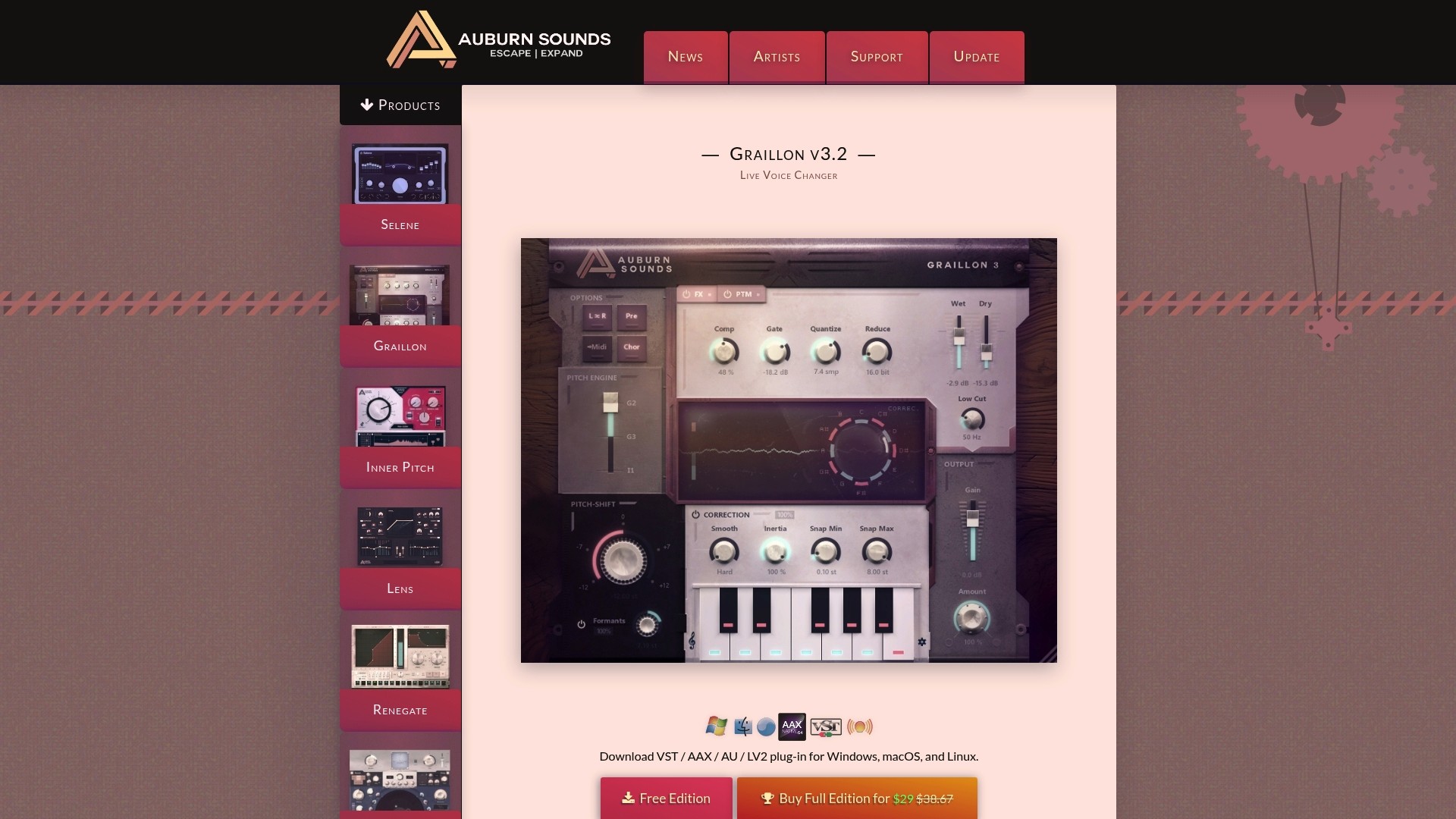
Runs with approximately 23ms latency, which keeps pitch shifting smooth while remaining usable in many studio and live setups. Graillon 2 delivers real-time pitch correction and pitch shifting without a heavy CPU hit, so you can load multiple instances in a project. The free core covers standard tuning needs, and the paid upgrade unlocks modulation and creative effects for a small fee.
Core Features
Graillon 2 gives real-time pitch correction with controls for inertia, smoothness, snap range, and correction amount so you can shape how tight the autotune reacts. The plugin also offers pitch shifting that preserves formants, keeping transposed vocals sounding natural across registers. The full edition adds Pitch-Tracking Modulation, a bitcrusher, and vocal doubling, and the tool ships in VST, AU, AAX, and LV2 formats with low CPU usage.
Key Differentiator
The standout here is a professional-grade tuning engine available in the free core plus creative pitch modulation tucked behind an inexpensive upgrade. That combination makes Graillon 2 a practical tool for budget producers who want both basic autotune and experimental vocal textures. Low CPU demands let you stack tracks without killing a laptop.
Pros
Graillon 2 gives budget producers a real tuning engine at no cost, so you get the sharp trap autotune effect without buying high-end software. The interface is straightforward, which helps new producers learn controls like inertia and snap range quickly. Cross-platform plugin formats and low CPU usage let you run many instances across Windows, macOS, and Linux projects, and the paid upgrade brings creative tools for voice design.
Cons
Latency of about 23ms can be audible compared with instant-retune commercial tools, which matters for tight live monitoring.
The full creative effect set requires the paid upgrade, which is roughly $29 USD for the full edition.
It lacks some advanced workflow polish and extra tuning algorithms found in high-end autotune suites.
Producers may need time to master inertia and snap range to dial in aggressive trap vocal tones reliably.
When It May Not Fit
If you need zero-latency, live-stage monitoring that demands instantaneous retune, this plugin can feel slow. If your studio relies on specific commercial workflows or features from premium autotune suites, Graillon 2 may not match those capabilities. Teams that must keep sessions stable across major version upgrades should plan for occasional compatibility checks.
Notable Integrations
VST on Windows, macOS, and Linux
AU on macOS
AAX for Pro Tools
LV2 for Linux
These formats cover the major DAWs producers use for trap and hip-hop tracking.
Who It’s For
This plugin fits new and intermediate producers, beatmakers, and vocalists working in home studios who need modern trap autotune on a tight budget. It suits creators who want an easy UI and low CPU load to stack aggressive vocal parts. Producers who plan to experiment with vocal textures but cannot afford top-tier plugins will find it useful.
Real World Use Case
A home-studio producer applies fast retune speed and a moderate snap range on a lead vocal to get that sharp, robotic trap tone while keeping formants intact so the voice still blends with dark instrumentals. Low CPU load lets the producer run parallel tracks with different tuning settings without glitching the session. Upgrading unlocks Pitch-Tracking Modulation and doubling for thicker vocal stacks.
Pricing
A free core version covers essential pitch correction and pitch shifting for budget work. The full edition upgrade costs about $29 USD, which adds Pitch-Tracking Modulation, bitcrusher, vocal doubling, and other creative effects.
Website: https://auburnsounds.com/products/Graillon.html
Comparison of alternatives
Artists seeking the autotune effect often balance portable immediacy with plugin refinement, making Voloco and Graillon 2 decisive competitors. Examining their respective attributes reveals key distinctions that cater to recording environments and customization requirements.
Mobile Workflow Versus Plugin Versatility
Voloco provides a purpose-built mobile application designed for vocal artists who prioritize immediacy. With features like automatic key detection, free beat libraries, and multitrack tools, it simplifies capturing vocals on the go. By contrast, Graillon 2 offers professional-grade tuning functions, including formant-preserving pitch adjustment and low latency, ideal for producers who demand refined control in desktop environments. Each tool reflects a commitment to user needs: portability for Voloco and detail adjustment for Graillon 2.
Free Core Features Against Subscription Models
Voloco offers basic features under a free tier that allows casual users to explore autotune within its ecosystem, scaling to more extensive functionality via a subscription. Graillon 2 provides essential autotune capabilities in its free core edition, complemented by affordable premium upgrades for creative effects. This contrast underlines Voloco’s tiered access versus Graillon 2’s singular, cost-effective upgrade path.
Best fit
Artists recording demos directly via phones should choose Voloco for its intuitive mobile-first design and live pitch correction.
Producers using diverse DAW platforms will appreciate Graillon 2’s plugin formats that foster integration.
Trap vocalists seeking quick yet effective autotune styling will benefit from Voloco’s presets tailored for the genre.
Independent audio engineers operating within strict budgets can maximize Graillon 2’s free tuning capabilities paired with the modest premium upgrade.
Our pick
Selecting between Voloco and Graillon 2 depends upon your recording setup and required customization levels. Voloco suits users who need mobile-ready workflows to produce immediate vocal sketches. Graillon 2 fits producers preferring detailed control for aggressive vocal styling in desktop setups. While Voloco supports spontaneous creativity, Graillon 2 rewards deliberate precision.
The table below compares Voloco and Graillon 2, focusing on features, usability, and pricing.
Product | Key Features | Best For | Notable Limitation | Pricing |
|---|---|---|---|---|
Voloco | Real-time pitch correction, mobile-first workflow | Emerging rappers and independent singers | Limited audio quality for professional applications | Free; $7.99/month or $59.99/year premium |
Graillon 2 | Real-time tuning with low CPU usage, Pitch-Tracking Modulation | Home studio producers and budget-conscious users | 23ms latency affects live monitoring | Free core; $29 full upgrade |
How To Nail Aggressive Trap Vocals Without Breaking Your Budget
You want that raw, modern trap vocal sound but don’t want to drop serious cash on industry software. Voloco and Graillon 2 give you the tools to get precise retune speed and pitch correction with free or low-cost options. The real challenge is pairing those settings with beats that match the vibe you’re going for. That’s where Indepthjaybeats steps in.
Indepthjaybeats offers a curated selection of dark trap and boom bap instrumentals designed for vocals treated with aggressive correction. With production experience dating back to 2007, this platform caters to independent rappers and content creators ready to push their sound. Test drive the free beat pack and find instrumentals that bring your pitch-perfect vocals to life.
Check out Indepthjaybeats now and link your autotuned vocals over beats built to hit hard. Push your trap vocal game with the right sound behind every line.
FAQ
Which app is better for aggressive trap vocal settings, Voloco or Graillon 2?
Voloco is better for aggressive trap vocal settings. It includes features like automatic key detection and a variety of style presets, such as Auto-Tune Hard, specifically designed for modern trap sounds. For artists focusing on capturing that distinct energy in their vocal performance, Voloco provides the tools needed to create polished tracks quickly.
How does the pricing of Voloco compare to Graillon 2?
Voloco offers a free version with basic features, while the premium subscription costs $7.99 USD per month or $59.99 USD per year. In contrast, Graillon 2 has a free core version as well, with a one-time upgrade cost of about $29 USD to unlock more creative features. Artists on tight budgets might find Graillon 2’s one-time fee more appealing after evaluating both options.
What specific features does Graillon 2 add for vocalists?
Graillon 2 enhances vocal processing with real-time pitch correction and a pitch-shifting feature that preserves formants, making vocals sound natural across different registers. It also offers additional tools like Pitch-Tracking Modulation and a bitcrusher in the paid version, providing aspiring artists with a way to experiment with their vocal textures more creatively.
Can I use Voloco for live performances?
Yes, you can effectively use Voloco for live performances thanks to its real-time processing abilities and built-in beat library. The app’s automatic pitch correction and various presets allow artists to deliver polished live vocals without extensive setup, making it a solid choice for performers on the go.
What is the latency of Graillon 2 when recording?
Graillon 2 has a latency of approximately 23ms, which keeps pitch shifting smooth and usable in many studio setups. While it might not be ideal for instant live monitoring, this latency is manageable for producers focused on creating trap vocals in a home studio environment.
Recommended

Get 20+ Free Beats delivered to your inbox
Drop your name and email and I'll send a pack to your inbox right away.
We respect your inbox, no spam. Promise!